Getting started guide for agents using Reddy for training and live call assistance
Reddy is your real-time co-pilot for every call. Get instant feedback, stay compliant with QA requirements, and improve continuously—no waiting for manager reviews.This guide covers everything you need to get started.
Real-time guidance during actual customer calls. Desktop app provides live transcripts, QA tracking, and AI assistance while you focus on the customer.During Your Call:
Reddy auto-detects the product based on queue name (95% accuracy) and displays the appropriate QA checklist.Verify Product Accuracy:
Check that the displayed product matches your call. If incorrect, manually select the correct product from the dropdown.Manual Override:
Agents can override the detected product if needed. The QA checklist and grading adjust accordingly.
Product swaps are limited to products assigned to your agent profile. Keep your assigned products updated.
Important: Completed QA items won’t show as checked after product change, but post-call grading ensures your score reflects actual performance.
The transcript shows everything said during the call in real-time. Review what the customer said if you missed it.Auto Scroll: Automatically follows the conversation to the latest verbiage.Manual Control:
Scroll up to reference earlier call moments
Auto scroll disables when you scroll up
Click “Scroll to End” to return to the current part and re-enable auto scrolling
QA Checklist
The QA checklist shows required steps for every call.
Follow checklist to ensure smooth call flow
Hover over QA items to see specific requirements
Collapse completed items to focus on what’s next
QA items automatically collapse when completed. Collapse manually to keep your view focused.
Toggle Between Checklist and Transcript
Click between QA checklist and transcript panel as needed during calls.
QA checklist: Track call requirements
Transcript panel: Review conversation details
Ask Reddy
When a customer asks a question you don’t know, use Ask Reddy instead of putting them on hold.
Click the “Ask Reddy” button in your application interface
Reddy analyzes the recent transcript to infer the question
AI searches all company documents instantly
Get accurate answers in seconds
Ask Reddy pulls from your company’s knowledge base. If answers seem incomplete, suggest your manager upload additional training materials.
After each simulation, review your performance and see what to improve.Progress Indicators:
Total Progress: Shows runs completed (e.g., 3 out of 5 runs)
Compliance Rating: Your score on the most recent attempt
If you haven’t met completion requirements (minimum runs or score), click “Continue Lesson” to practice again. Once requirements are met, you’ll advance to the next lesson.
Performance Summary:
Encouraging message with specific feedback on critical steps you missed and areas you handled well.Quality Assurance:
Missed: QA items you didn’t complete
Passed: QA items you completed successfully
Not Applicable: QA items that didn’t apply to this call
Click any QA item to view grading criteria and understand requirements.
Review feedback after every simulation. Identify patterns and focus on consistent improvement.
After each live call, review your personalized performance analysis.Feedback Panel:
Click “Feedback” in the post-call pop-up to open deeper call insights with action-ready summaries.What You’ll See:Agent Areas of Improvement:
Customizable summary highlighting key wins, compliance gaps, and next-best actions prioritized for quick follow-up.Agent Strengths:
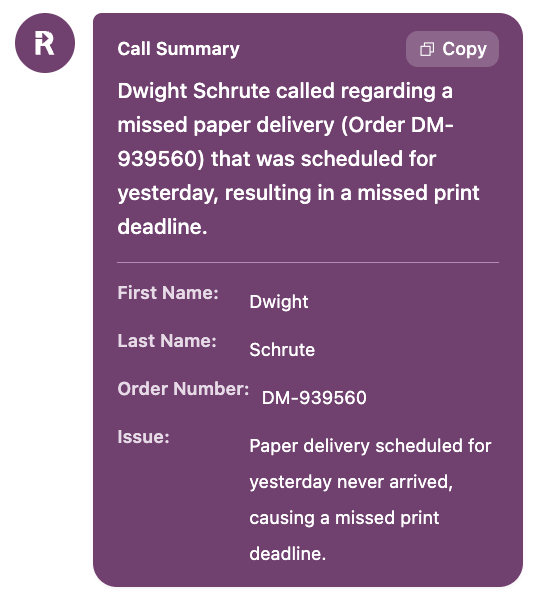
Recognition of what you did well—specific skills and behaviors you demonstrated effectively.Call Summary:
Overview of the customer interaction, key discussion points, and resolution details.QA Item Breakdown:
Missed QAs: Requirements you didn’t complete (shown in red)
What Went Well: Requirements you completed successfully (shown in green)
Feedback summaries are customized for your organization. Contact your Reddy CSM to configure summarizations for your team’s specific needs.
Review feedback while the call is fresh. Identify patterns and adjust your approach for the next customer interaction.
Your manager can leave coaching feedback on both training simulations and live calls. This creates a direct communication channel for performance improvement and recognition.When Your Manager Leaves Feedback:
You’ll receive an in-app notification in your agent dashboard
Click the notification to go directly to the call record
Viewing Feedback:Navigate to the Feedback tab on any call record to see your manager’s coaching comments. Feedback is specific to that call and focuses on what you did well and opportunities for improvement.Responding to Feedback:After reading your manager’s feedback, choose how to respond:
Acknowledge
Dispute
Click Acknowledge when you:
Understand the feedback
Agree with the coaching points
Plan to apply the feedback to future calls
After acknowledging, you can optionally add a comment explaining your plan to improve or thanking your manager for specific guidance.
Click Dispute when you:
Disagree with the feedback
Have context your manager may not have considered
Want to discuss the feedback further
After disputing, always add a comment to explain your perspective. This helps your manager understand your reasoning and creates an opportunity for productive coaching conversations.
Closing the Loop:When you respond (acknowledge or dispute), your manager receives a notification linking back to the Feedback tab. This ensures your response is seen and creates an opportunity for follow-up conversations when needed.
View manager feedback as coaching, not criticism. Even when feedback highlights improvement areas, it’s designed to help you succeed and handle customer interactions with confidence.
Training doesn’t stop after onboarding. Your manager can assign targeted practice to help you master specific skills while you’re already taking customer calls.Training Notifications:
Check the notification bell in your agent dashboard for new assignments. When assigned additional practice:
You’ll receive an alert with a “Practice” button
Click to jump directly to the simulation
Complete the training at your convenience
Notification marks as read once finished
Managers assign extra practice to reinforce skills, not as a penalty. It’s a tool to help you excel and handle customer interactions with confidence.
Notifications appear only in the agent dashboard (web application), not in Live Assist.
Before your first training session, complete the microphone check. This ensures Reddy can hear your simulations and provide accurate feedback.If your microphone fails the check, most problems have quick fixes. Microphone troubleshooting guide →
Why hasn't my course completion updated?
Course completion status updates only after you finish all assigned simulations in the course, not after each individual simulation.Check your course dashboard to see remaining simulations. Once all are complete, your status will update.
How do I know which QA items are required?
Hover your mouse over any QA checklist item to see the specific requirement. This shows exactly what you need to do to complete that item successfully.
Can I use Reddy on my phone?
Training and performance review: Yes, access via web browser at app.reddy.ioLive Assist: No, requires desktop application for real-time call assistance.
What if Ask Reddy doesn't have the answer?
Ask Reddy pulls from your company’s knowledge base. If information is missing:
Ask your manager (like you normally would)
Suggest your manager upload missing content to the knowledge base
Over time, Ask Reddy will become more comprehensive
Will leadership see all my mistakes?
Leadership reviews your call data to provide coaching and support your development. Reddy helps you improve before leadership reviews your performance, so you can address issues proactively. Think of it as getting a preview of your performance review after every call.
When you encounter problems, report them directly in Reddy. This ensures your issue reaches support immediately, technical details are automatically captured, and resolution is faster.While telling your manager is helpful, reporting in Reddy guarantees it’s tracked and investigated promptly.Get Help & Report Issues →