

Training Language
Call Driver
Call Driver
The primary reason a customer reaches out for service. Each call driver represents a distinct issue with its own resolution path and handling requirements.Examples:
- Password reset request
- Software installation issue
- Payment processing error
- Invoice inquiry
- Product upgrade consultation
- Refund request
Scenario
Scenario
A realistic end-to-end path within a call driver. Each scenario has a clear starting point, decision branches based on customer responses, and a defined resolution.Example - Password Reset Call Driver:Scenario 1: Standard Reset
- Start: Customer calls unable to log in
- Call Flow Steps: Email verification > security questions > send reset link
- End: Password successfully reset, customer logs in
- Start: Customer calls after multiple failed login attempts
- Call Flow Steps: Identity verification > account unlock > password reset > additional security setup
- End: Account unlocked and secured
Build scenarios one at a time based on observed customer interactions. Scenarios can share the same start or end state but differ in their call flow steps based on customer responses and situational factors.
Dynamic Situations
Dynamic Situations
Conditional factors that determine which scenario path an agent follows within a call driver. These situations create branching logic and require different handling approaches.Password Reset Call Driver - Dynamic Situations:
- Account Status: Account locked vs. active
- Authentication Method: Customer has access to registered email vs. security questions only
- Verification Success: Customer passes security checks vs. requires additional verification
- System Access: Customer can receive reset link vs. requires manual unlock by agent
Recipe
Recipe
The rule set that powers AI coaching and validation during simulations. Recipes define required inputs, validation checks, and prescribed actions for each scenario.Recipe Components:
- Required Information: What must be collected (account details, issue description, customer needs)
- Validation Checks: What must be verified (identity confirmation, eligibility, system status)
- Prescribed Actions: Steps that must be completed (system updates, documentation, follow-up scheduling)
Recipes ensure consistent coaching across all agents and provide the framework for AI feedback during training.
Defining Your First Training Simulation
Work with your Reddy Project Manager to identify your first simulation:1
Select one high-impact call driver
Choose based on volume, quality needs, or business impact. Avoid edge cases for your first simulation.
2
Map common scenarios
Identify the most common paths with clear start states, decision branches, and end states.
3
Define call flow logic and supporting details
Document the required call flow steps, decision points, and supporting knowledge needed for each scenario (scripts, SOPs, process docs, compliance requirements).
4
Provide training materials to Reddy
Share process docs, scripts, FAQs, and call recordings with your Reddy Project Manager.
Required Handoff Material
Required Handoff Material
Reddy requests supporting materials:
- 10 full-screen agent recordings (with audio)
- Training resources (call flows, policies, help articles, training decks)
- Current QA scorecard
- 20 graded call recordings (mix of high and low scores)
After reviewing materials, Reddy schedules a follow-up meeting with your call flow SME to walk through key scenarios and clarify any questions.
Example: Complete Simulation Scope
Call Driver: Password Reset Request Handoff Materials Provided:- Call flow diagrams showing verification and reset processes
- Training decks covering security protocols
- SOPs for account verification and password reset procedures
- Call recordings demonstrating standard and locked account scenarios
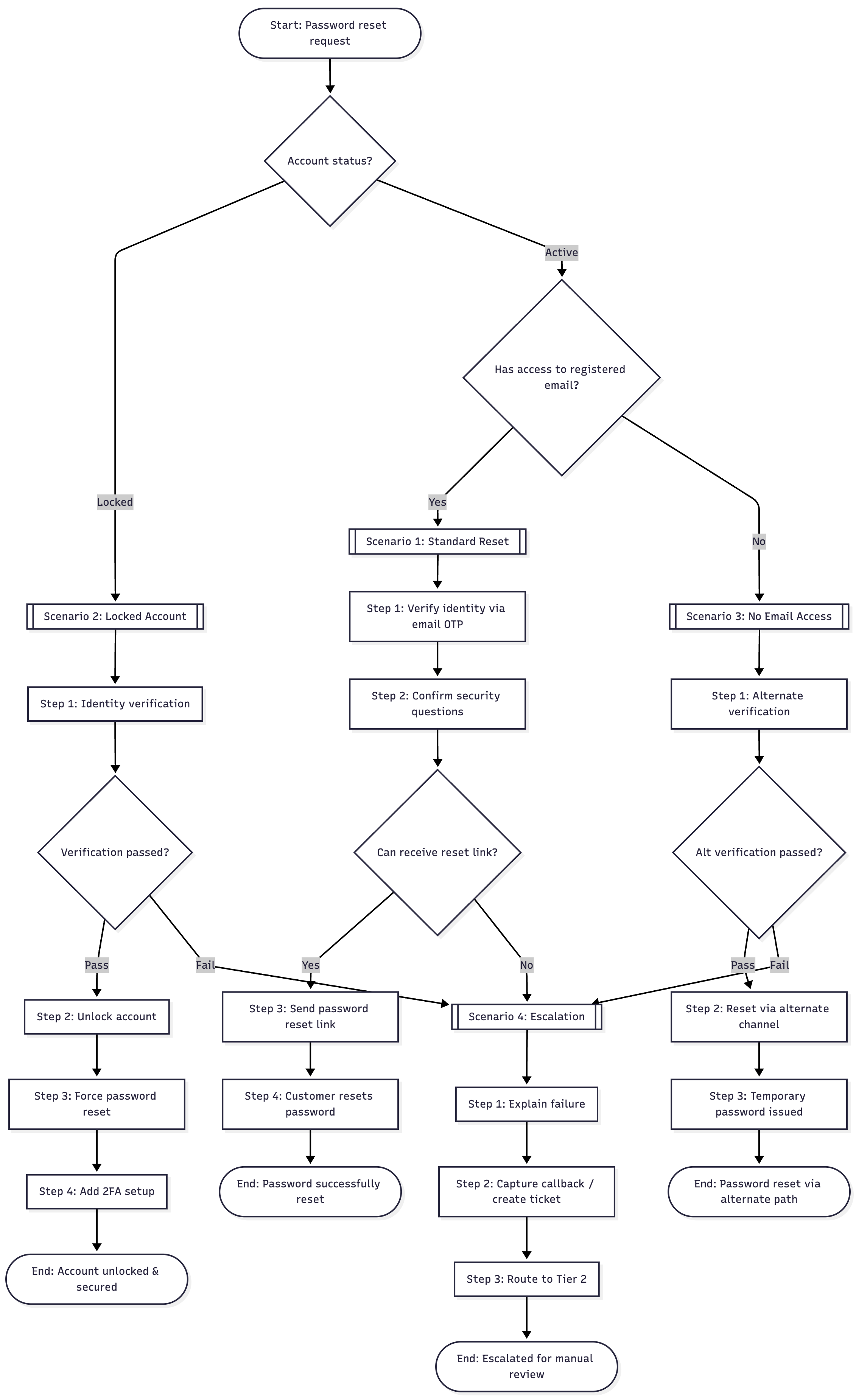
- Standard Reset: Active account, customer has email access
- Locked Account: Multiple failed login attempts, requires identity verification
- No Email Access: Customer cannot receive reset link, requires security questions
Next Steps
After defining your first simulation:- Provide call driver materials to your Reddy Project Manager (call flows, SOPs, training decks, recordings)
- Schedule SME walkthrough where your SME roleplays the call flow step-by-step, reviews Reddy-generated scenarios based on your materials, and answers follow-up questions