> ## Documentation Index
> Fetch the complete documentation index at: https://docs.reddy.io/llms.txt
> Use this file to discover all available pages before exploring further.
# Custom Configurations
> Personalize reporting and insights to meet your organization's specific needs
Configure AI-generated insights tailored to your workflows. Submit a [request form](https://docs.google.com/spreadsheets/d/1MBJQRCccGWWdW6wrTwIXIZueqwRiuAFx/edit?usp=sharing\&ouid=105820164515144953827\&rtpof=true\&sd=true) to your Reddy Project Manager—we'll fine-tune the prompting and implement.
## Available Configurations
AI-generated insights created for every call.
**What You Get:**
* **Default Coaching Feedback:** Standard coaching delivered to agents after every call
* **Default Call Summary:** 2-3 sentence call overview
* **Custom Insights:** Unlimited additional summaries for your business needs
**Examples:**
* Top 3 areas of improvement and agent strengths
* Customer issues and resolution paths
* Policy adherence or compliance concerns
* Sales data or upsell opportunities
* Role-specific feedback (agent, manager, executive)
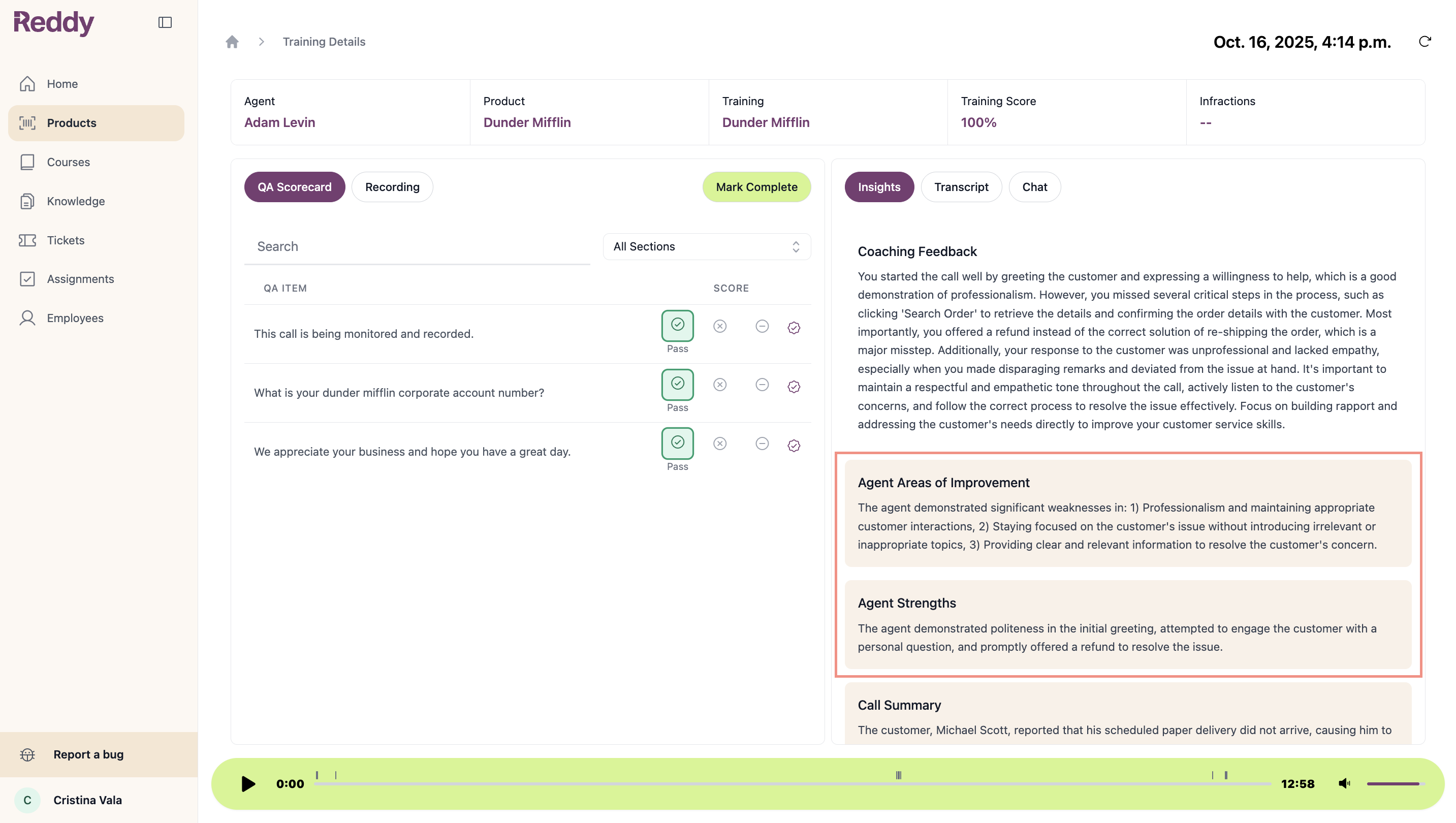 Custom insights (beige boxes) can be configured per product or company-wide. Generated fresh for every call.
AI tags that categorize calls based on transcript analysis and QA scores.
**How It Works:**
Tags scan transcripts and scores to label key call attributes. Each tag becomes a filterable dashboard category.
**Examples:**
* **Objection Theme:** Customer objection type (Customer Service, Price, Product Quality)
* **Manager Alert:** Calls requiring management attention (profanity, failed objection handling, policy violations)
* **Disposition:** Call outcomes (Sale, No Service, Upsell Opportunity, Complaint)
* **Compliance Issue:** Policy adherence or violations
Custom insights (beige boxes) can be configured per product or company-wide. Generated fresh for every call.
AI tags that categorize calls based on transcript analysis and QA scores.
**How It Works:**
Tags scan transcripts and scores to label key call attributes. Each tag becomes a filterable dashboard category.
**Examples:**
* **Objection Theme:** Customer objection type (Customer Service, Price, Product Quality)
* **Manager Alert:** Calls requiring management attention (profanity, failed objection handling, policy violations)
* **Disposition:** Call outcomes (Sale, No Service, Upsell Opportunity, Complaint)
* **Compliance Issue:** Policy adherence or violations
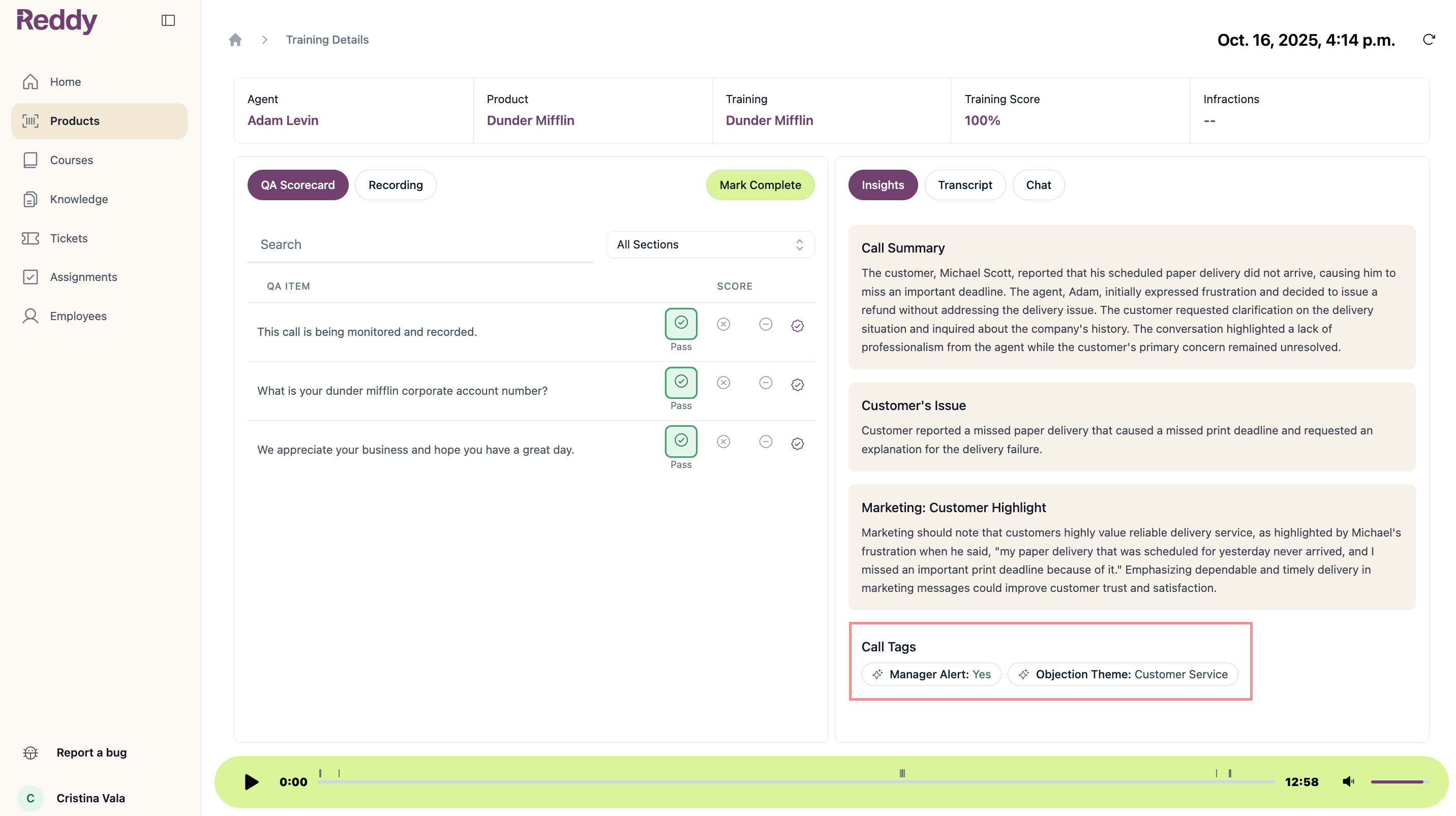 Call tags and custom data fields become filterable dashboard categories.
**Filter Options:**
* **Call Tags:** Manager Alert, Objection Theme, Disposition, Compliance Issue
* **Custom Data:** Business units, product categories, customer segments, KPIs
**How to Use:**
1. Click "Add Filter" on any dashboard
2. Select call tag or custom data field
3. Choose values to filter by
4. Combine filters for granular analysis
Call tags and custom data fields become filterable dashboard categories.
**Filter Options:**
* **Call Tags:** Manager Alert, Objection Theme, Disposition, Compliance Issue
* **Custom Data:** Business units, product categories, customer segments, KPIs
**How to Use:**
1. Click "Add Filter" on any dashboard
2. Select call tag or custom data field
3. Choose values to filter by
4. Combine filters for granular analysis
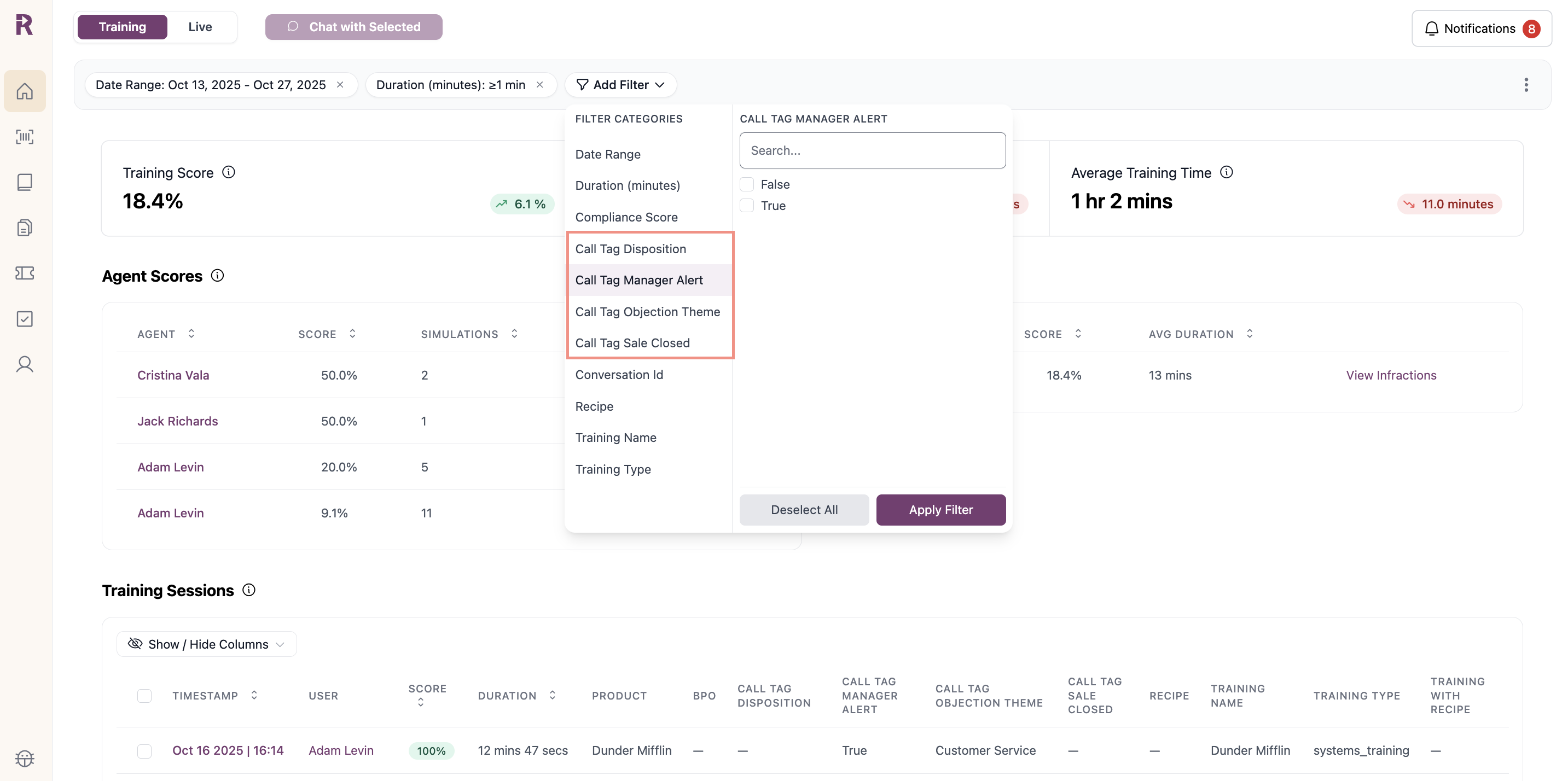 **Example Combinations:**
* "Objection Theme: Customer Service" to coach on service objections
* "Manager Alert: True" to review escalation-worthy calls
* "Manager Alert: True" + "Compliance Score > 75%" to find calls with high scores but broken rules
* "Business Unit: Sales" + "Call Tag: Upsell Opportunity" for targeted enablement
After filtering, use "Chat with Selected" to analyze patterns across the subset.
Real-time context summaries for agents during calls or simulations.
**What It Provides:**
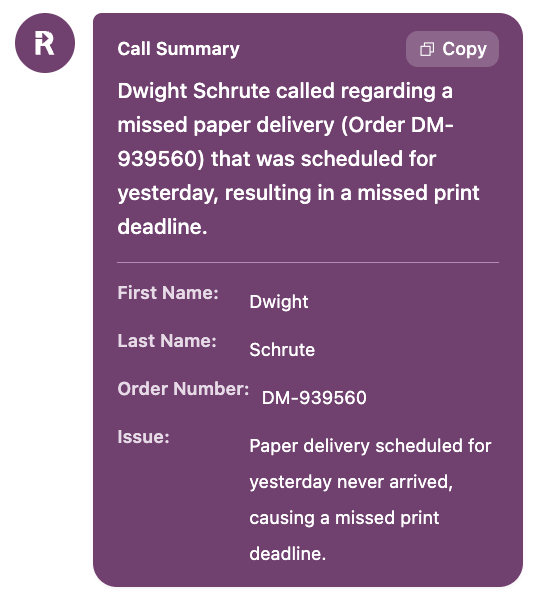
* Caller details (name, email, address)
* Brief call summary with copy-to-clipboard
**Benefits:**
Faster issue resolution without navigating away from the call.
**Example Combinations:**
* "Objection Theme: Customer Service" to coach on service objections
* "Manager Alert: True" to review escalation-worthy calls
* "Manager Alert: True" + "Compliance Score > 75%" to find calls with high scores but broken rules
* "Business Unit: Sales" + "Call Tag: Upsell Opportunity" for targeted enablement
After filtering, use "Chat with Selected" to analyze patterns across the subset.
Real-time context summaries for agents during calls or simulations.
**What It Provides:**
* Caller details (name, email, address)
* Brief call summary with copy-to-clipboard
**Benefits:**
Faster issue resolution without navigating away from the call.
 Custom prompts for analyzing call transcripts.
**How It Works:**
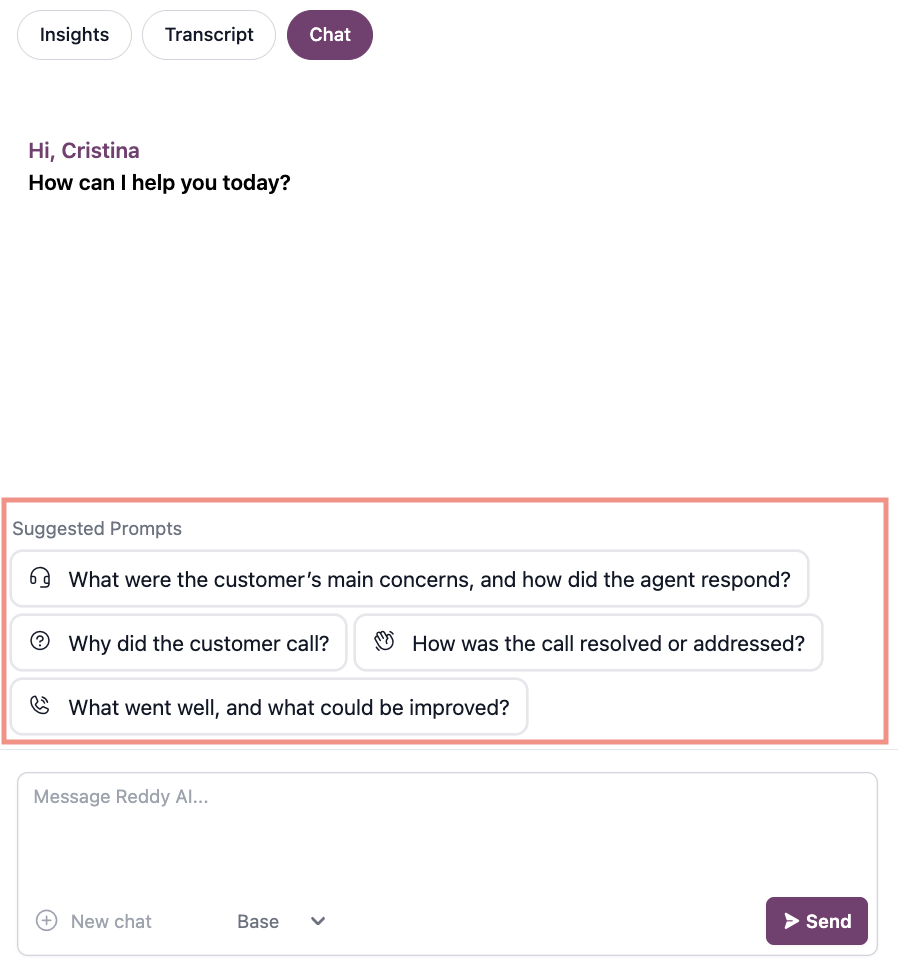
One-click access to common analyses via suggested prompts.
Custom prompts for analyzing call transcripts.
**How It Works:**
One-click access to common analyses via suggested prompts.
 **Examples:**
* "What were the customer's main concerns, and how did the agent respond?"
* "Why did the customer call?"
* "How was the call resolved or addressed?"
* "What went well, and what could be improved?"
* "Extract all product mentions and customer sentiment"
* "Summarize compliance adherence across selected calls"
* "Identify training opportunities from this week's calls"
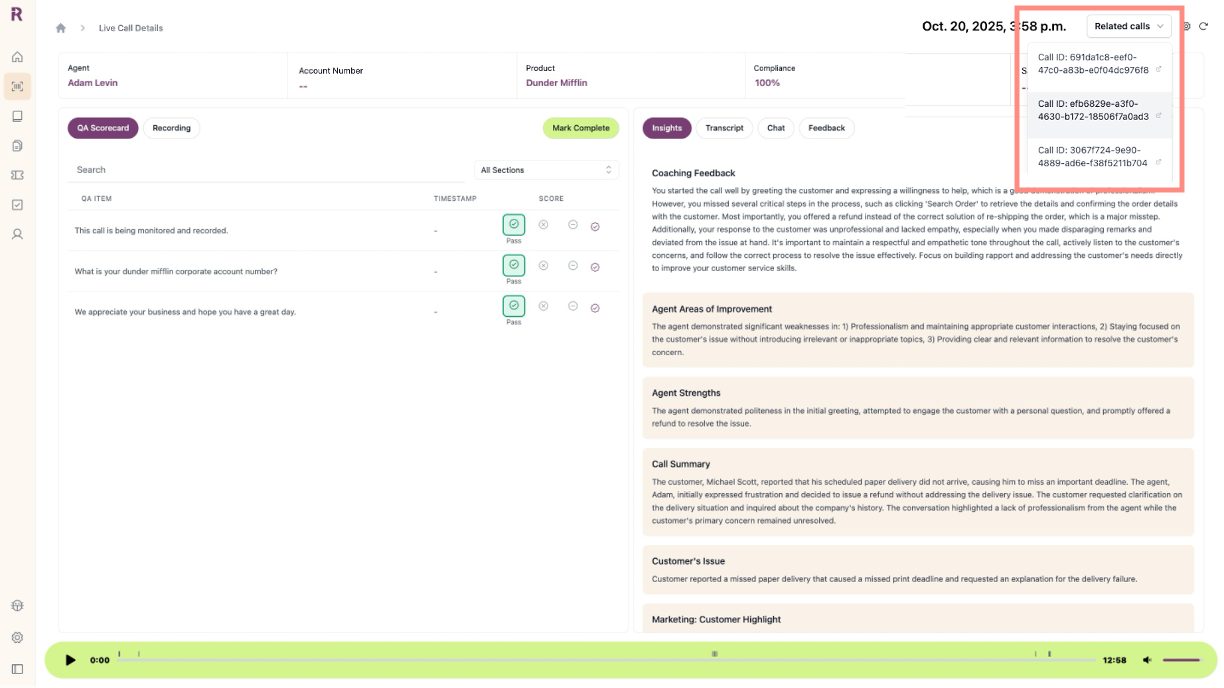
Link calls by customer identifier to view all interactions with the same customer.
**How It Works:**
* Calls with matching identifiers are automatically linked
* **Related Calls** button appears in top right corner of call details page when 2+ calls exist for the same customer
**Examples:**
* "What were the customer's main concerns, and how did the agent respond?"
* "Why did the customer call?"
* "How was the call resolved or addressed?"
* "What went well, and what could be improved?"
* "Extract all product mentions and customer sentiment"
* "Summarize compliance adherence across selected calls"
* "Identify training opportunities from this week's calls"
Link calls by customer identifier to view all interactions with the same customer.
**How It Works:**
* Calls with matching identifiers are automatically linked
* **Related Calls** button appears in top right corner of call details page when 2+ calls exist for the same customer
 **Benefits:**
* View complete customer interaction history
* Track issue resolution across multiple touchpoints
Customer identifiers are organization-specific and must be configured through your integration or API.
## How to Request
Open the [Custom Configuration Request Form](https://docs.google.com/spreadsheets/d/1MBJQRCccGWWdW6wrTwIXIZueqwRiuAFx/edit?usp=sharing\&ouid=105820164515144953827\&rtpof=true\&sd=true) and add one row per configuration:
* **Customization Type:** Call Summaries, Call Tags, or Chat Prompts
* **Name:** What to call this insight or tag
* **Product(s):** Which products this applies to (or "All")
* **Permission:** *(Call Summaries only)* Who can view:
* **All Reddy Users (agent included):** Everyone
* **Manager + Admin:** Hidden from agents
* **Admin Only:** Admins only
* **Description:** What you want extracted or tracked
Hide insights from agents when tracking sensitive metrics or internal performance indicators.
Send completed form to your Reddy Project Manager.
Reddy fine-tunes prompting and implements your configurations.
Explore new insights and filters. Send feedback to adjust configurations.
**Benefits:**
* View complete customer interaction history
* Track issue resolution across multiple touchpoints
Customer identifiers are organization-specific and must be configured through your integration or API.
## How to Request
Open the [Custom Configuration Request Form](https://docs.google.com/spreadsheets/d/1MBJQRCccGWWdW6wrTwIXIZueqwRiuAFx/edit?usp=sharing\&ouid=105820164515144953827\&rtpof=true\&sd=true) and add one row per configuration:
* **Customization Type:** Call Summaries, Call Tags, or Chat Prompts
* **Name:** What to call this insight or tag
* **Product(s):** Which products this applies to (or "All")
* **Permission:** *(Call Summaries only)* Who can view:
* **All Reddy Users (agent included):** Everyone
* **Manager + Admin:** Hidden from agents
* **Admin Only:** Admins only
* **Description:** What you want extracted or tracked
Hide insights from agents when tracking sensitive metrics or internal performance indicators.
Send completed form to your Reddy Project Manager.
Reddy fine-tunes prompting and implements your configurations.
Explore new insights and filters. Send feedback to adjust configurations.