> ## Documentation Index
> Fetch the complete documentation index at: https://docs.reddy.io/llms.txt
> Use this file to discover all available pages before exploring further.
# Managing Report Access
> Control which admins can view and edit reports with read-only and edit access levels.
Reports contain sensitive performance data, so access is granted per admin. A report owner decides who can open reports and who can change them, using three access levels.
Access to reports is no longer automatic for every admin. An admin sees the **Reports** tab only after a report owner grants them Read or Edit access. Managers and agents continue to see their own published reports as before.
## Access levels
| Level | See Reports tab, list, and reports | Create, edit, publish, delete, rename | Manage access |
| ----------------- | :--------------------------------: | :-----------------------------------: | :-----------: |
| No access | No | No | No |
| **Viewer** (Read) | Yes (read-only) | No | No |
| **Editor** (Edit) | Yes | Yes | No |
| **Owner** | Yes | Yes | Yes |
**Owners** are assigned by Reddy during setup. If you need to change who owns reports at your organization, contact your Customer Success Manager. Owners manage Read and Edit access for everyone else themselves, using the steps below.
## Grant report access
Only report owners see the Report Access controls. If you do not see them, you are not a report owner.
Click the **gear (Settings)** icon at the bottom of the left navigation bar, then open the **General** tab.
Scroll to the **Report Access** section and click **Manage report access**.
 For each admin, check **Read** to let them view reports, or **Edit** to also let them create and change reports. Use the search box to find a specific admin.
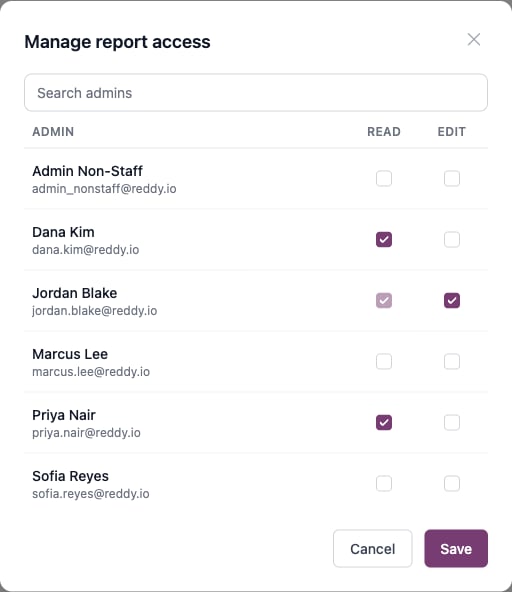 Checking **Edit** automatically includes Read -- an editor can always view what they can change. To remove someone's access entirely, uncheck both boxes.
Click **Save**. Each admin is updated to Viewer, Editor, or no access to match what you selected.
## What each access level sees
Viewers can browse the reports list and open any report, but every editing control is hidden. In the report actions menu, viewers get a **View** option instead of Edit, with no Duplicate or Delete.
Checking **Edit** automatically includes Read -- an editor can always view what they can change. To remove someone's access entirely, uncheck both boxes.
Click **Save**. Each admin is updated to Viewer, Editor, or no access to match what you selected.
## What each access level sees
Viewers can browse the reports list and open any report, but every editing control is hidden. In the report actions menu, viewers get a **View** option instead of Edit, with no Duplicate or Delete.
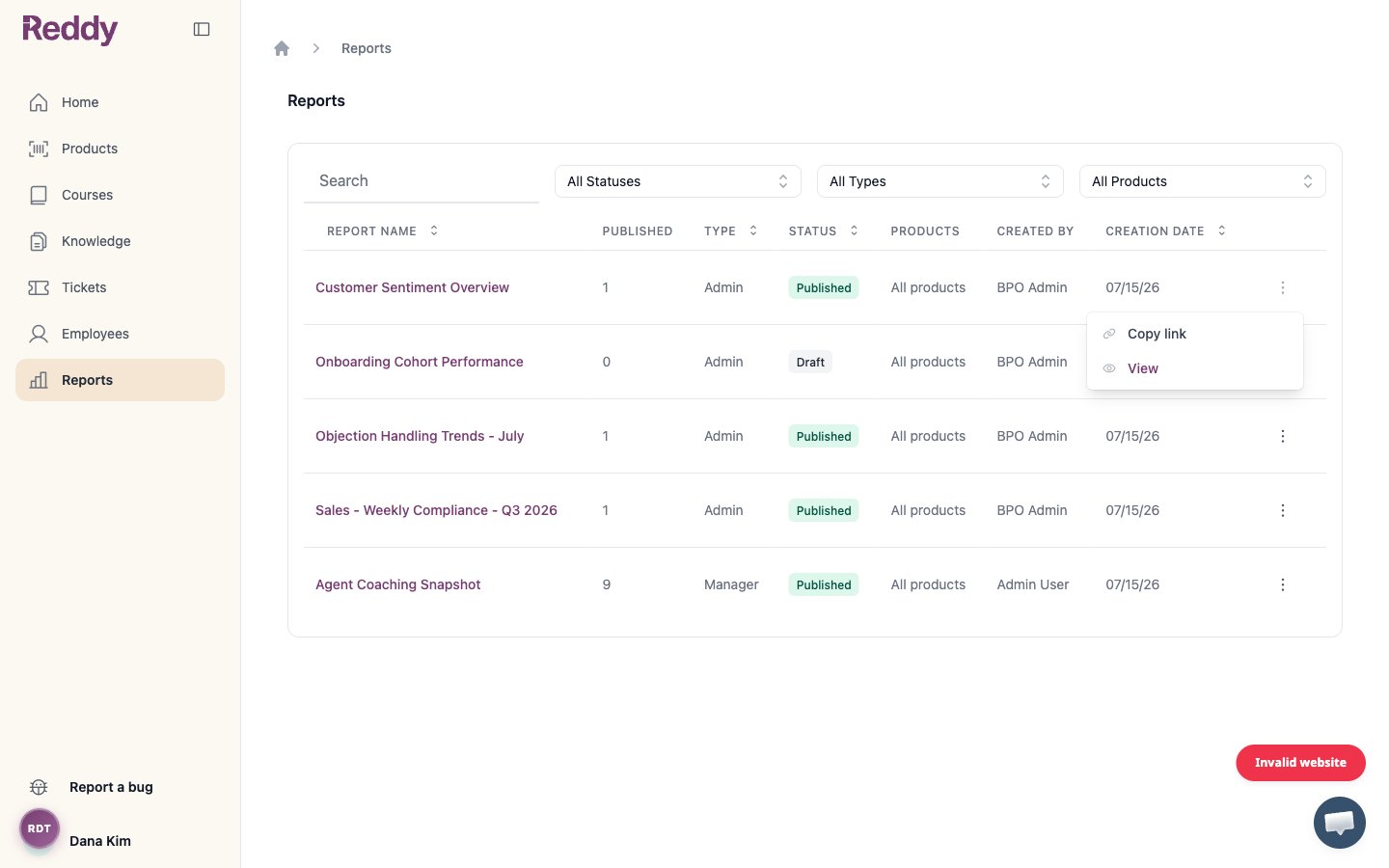 When a viewer opens a report, it loads in read-only preview: there is no Edit toggle, no toolbar, and the layout cannot be changed. Viewers also do not see the **Create new report** button.
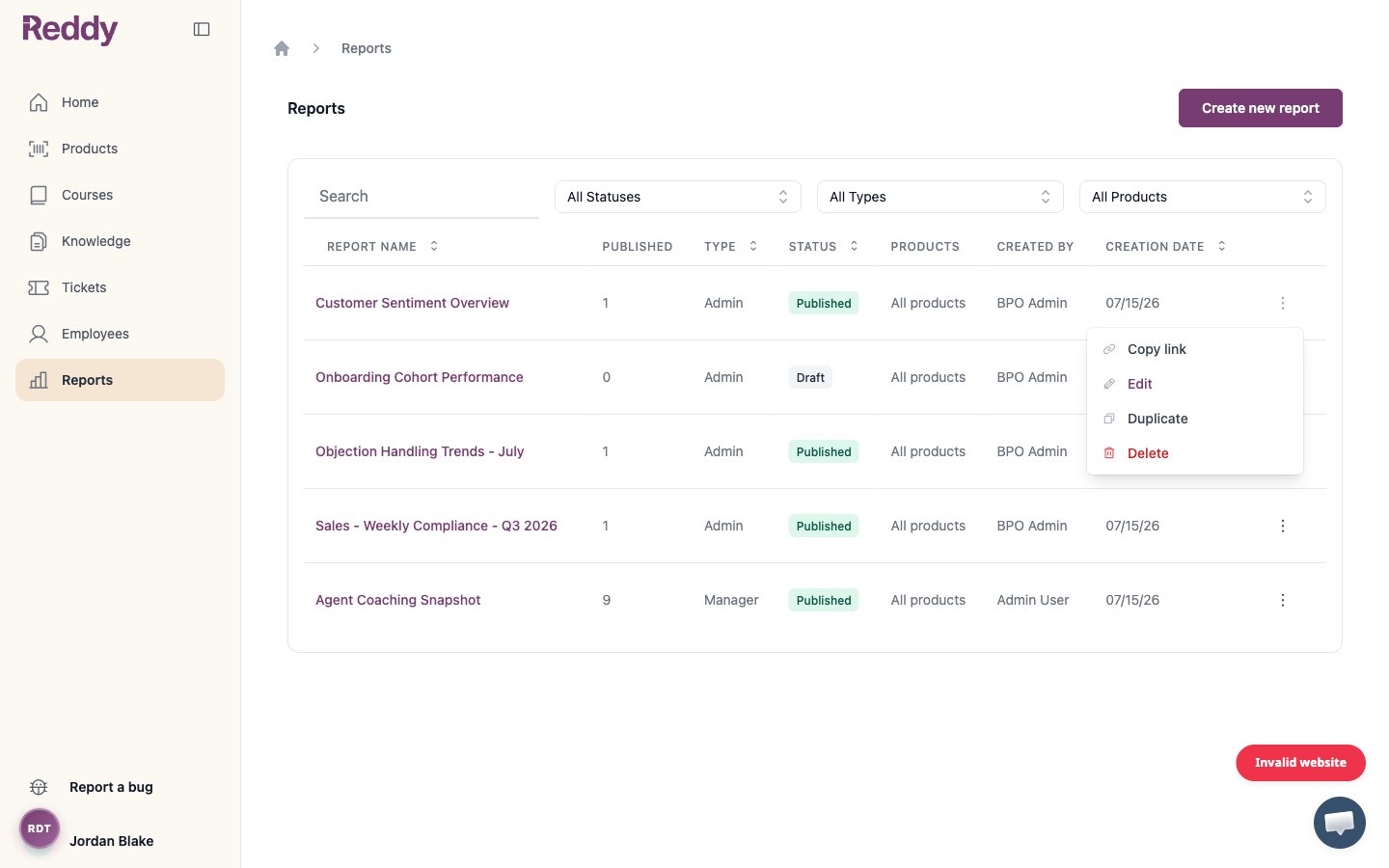
Editors have the full report toolset. The actions menu includes **Edit**, **Duplicate**, and **Delete**, and the **Create new report** button is available.
When a viewer opens a report, it loads in read-only preview: there is no Edit toggle, no toolbar, and the layout cannot be changed. Viewers also do not see the **Create new report** button.
Editors have the full report toolset. The actions menu includes **Edit**, **Duplicate**, and **Delete**, and the **Create new report** button is available.
 For how editors build and publish reports, see [Building Reports](/manual/reporting-insights/building-reports).
## Let agents and managers see their reports
Report owners also control whether published manager and agent reports are visible to those employees. Two toggles in the same **General** settings section handle this:
* **Let agents see their published reports** -- when on, published agent reports are visible to the agents they cover.
* **Let managers see their published reports** -- when on, published manager reports are visible to the managers they cover.
These defaults apply to reports published *after* the setting is changed. Already-published reports keep the visibility they had when they were published.
## FAQ
**Read** (Viewer) lets an admin open and browse reports but change nothing. **Edit** (Editor) additionally lets them create, edit, publish, rename, duplicate, and delete reports. Checking Edit always includes Read.
They have not been granted report access. Ask a report owner to open **Settings > General > Manage report access** and check **Read** (for view-only) or **Edit** for that admin.
Owners are managed separately by Reddy and are never changed from this screen, so they do not appear in the Read/Edit list. To change owners, contact your Customer Success Manager.
Viewers see every report in your company except any that have been specifically hidden from read-only viewers. Owners, editors, and Reddy staff always see every report.
In **Manage report access**, uncheck both **Read** and **Edit** for that admin, then click **Save**. They lose access to the Reports tab.
For how editors build and publish reports, see [Building Reports](/manual/reporting-insights/building-reports).
## Let agents and managers see their reports
Report owners also control whether published manager and agent reports are visible to those employees. Two toggles in the same **General** settings section handle this:
* **Let agents see their published reports** -- when on, published agent reports are visible to the agents they cover.
* **Let managers see their published reports** -- when on, published manager reports are visible to the managers they cover.
These defaults apply to reports published *after* the setting is changed. Already-published reports keep the visibility they had when they were published.
## FAQ
**Read** (Viewer) lets an admin open and browse reports but change nothing. **Edit** (Editor) additionally lets them create, edit, publish, rename, duplicate, and delete reports. Checking Edit always includes Read.
They have not been granted report access. Ask a report owner to open **Settings > General > Manage report access** and check **Read** (for view-only) or **Edit** for that admin.
Owners are managed separately by Reddy and are never changed from this screen, so they do not appear in the Read/Edit list. To change owners, contact your Customer Success Manager.
Viewers see every report in your company except any that have been specifically hidden from read-only viewers. Owners, editors, and Reddy staff always see every report.
In **Manage report access**, uncheck both **Read** and **Edit** for that admin, then click **Save**. They lose access to the Reports tab.