> ## Documentation Index
> Fetch the complete documentation index at: https://docs.reddy.io/llms.txt
> Use this file to discover all available pages before exploring further.
# Agent Feedback
> Leave feedback on training and live calls to coach agents and track responses
Provide coaching feedback on call records and track agent responses through in-app notifications. Managers can leave feedback on both training simulations and live calls, creating a direct communication channel for performance improvement.
## How It Works
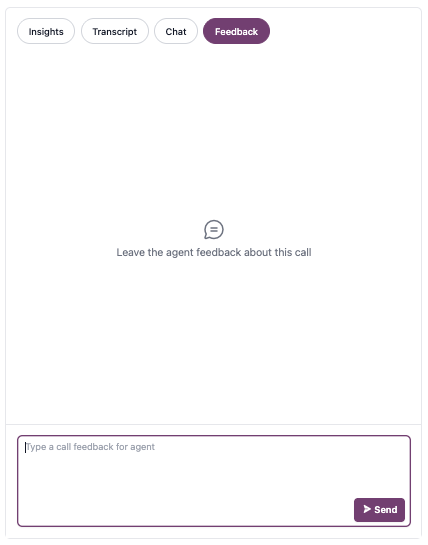
Navigate to any call record and open the **Feedback** tab. Type your feedback and click **Send** to submit.
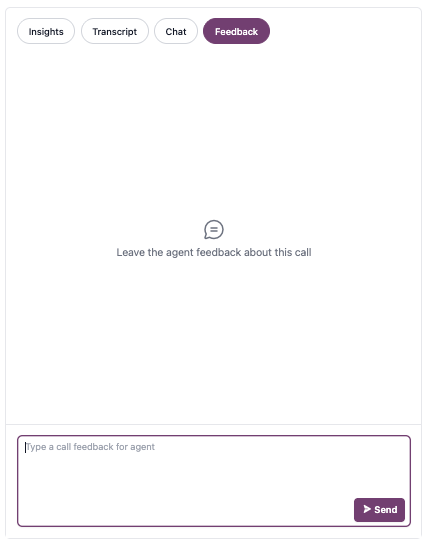 Each call record supports one feedback message.
The agent receives an in-app notification linking directly to the call record's Feedback tab for review.
Each call record supports one feedback message.
The agent receives an in-app notification linking directly to the call record's Feedback tab for review.
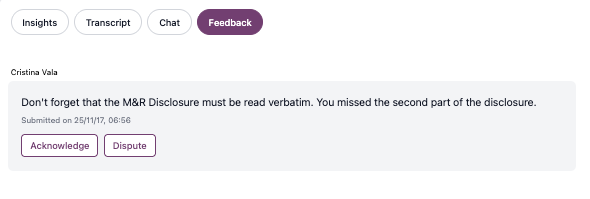
 The agent can **Acknowledge** or **Dispute** the feedback, then optionally add a comment explaining their perspective.
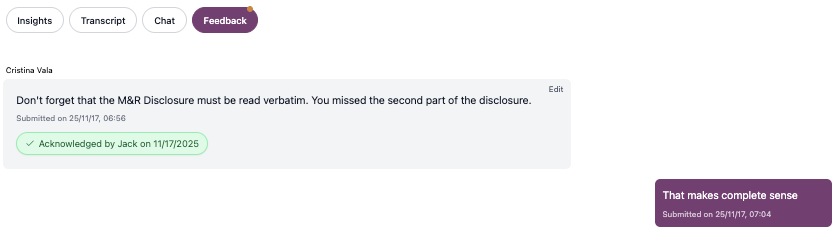
 When the agent responds, the manager receives an in-app notification linking back to the Feedback tab.
* Review the agent's response (Acknowledged or Disputed)
* Read any additional comments the agent provided
When the agent responds, the manager receives an in-app notification linking back to the Feedback tab.
* Review the agent's response (Acknowledged or Disputed)
* Read any additional comments the agent provided
 ## Filtering by Feedback Status
Use dashboard filters to analyze feedback trends and follow up on unresolved items.
**Available feedback filters:**
* **Submitted Feedback:** All calls where you've left feedback
* **Acknowledged Feedback:** Calls where agents acknowledged your feedback
* **Disputed Feedback:** Calls where agents disputed your feedback
## FAQ
You can edit feedback after sending, but you cannot delete it. To edit, click the **Edit** button on your feedback message, make your changes, and save. Edited messages display a timestamp showing when the last edit was made (e.g., "Last edited on 25/11/17, 07:15").
No, each call record supports one feedback message. Ensure you have captured all critical feedback on the most important coaching points before sending your message.
Yes, agents can see which manager left feedback on their call records.
Agents are not required to respond to feedback. Use the "Submitted Feedback" filter to identify calls where you've provided coaching, regardless of agent response status.
## Filtering by Feedback Status
Use dashboard filters to analyze feedback trends and follow up on unresolved items.
**Available feedback filters:**
* **Submitted Feedback:** All calls where you've left feedback
* **Acknowledged Feedback:** Calls where agents acknowledged your feedback
* **Disputed Feedback:** Calls where agents disputed your feedback
## FAQ
You can edit feedback after sending, but you cannot delete it. To edit, click the **Edit** button on your feedback message, make your changes, and save. Edited messages display a timestamp showing when the last edit was made (e.g., "Last edited on 25/11/17, 07:15").
No, each call record supports one feedback message. Ensure you have captured all critical feedback on the most important coaching points before sending your message.
Yes, agents can see which manager left feedback on their call records.
Agents are not required to respond to feedback. Use the "Submitted Feedback" filter to identify calls where you've provided coaching, regardless of agent response status.